Thursday, March 17, 2016

WCF Services : System.ServiceModel(serviceBehaviors and bindings) settings for Http and Https.

Goal

When a WCF service is converted from HTTP to HTTPS the service stops working. Here are the web.config settings. Which can fix the issue.
<!-- SERVICE MODEL -->
  <system.serviceModel>
    <behaviors>

      <serviceBehaviors>
        <!-- HTTP :  Behavior : Start -->
        <behavior name="httpBehavior">
          <serviceMetadata httpGetEnabled="true" />
          <serviceDebug includeExceptionDetailInFaults="false" />
        </behavior>
        <!-- HTTP :  Behavior : END -->
        <!-- HTTPS :  Behavior : Start -->
        <behavior name="httpsBehavior">
          <serviceMetadata httpGetEnabled="true" httpsGetEnabled="true" />
          <useRequestHeadersForMetadataAddress />
          <serviceDebug includeExceptionDetailInFaults="true" />
        </behavior>
        <!-- HTTPS :  Behavior : END -->
      </serviceBehaviors>
    </behaviors>
    <protocolMapping>
      <add binding="basicHttpsBinding" scheme="httpsBinding" />
    </protocolMapping>
    <serviceHostingEnvironment aspNetCompatibilityEnabled="true" multipleSiteBindingsEnabled="true"
                               minFreeMemoryPercentageToActivateService="5" />
    <bindings>
      <basicHttpBinding>
        <!-- HTTP :  Binding : Start -->
        <binding name="httpBinding" allowCookies="true" bypassProxyOnLocal="true" textEncoding="utf-8"
                 messageEncoding="Text" maxReceivedMessageSize="2147483647" maxBufferSize="2147483647"
                 maxBufferPoolSize="2147483647">
          <readerQuotas maxDepth="2147483647" maxStringContentLength="2147483647" maxArrayLength="2147483647"
                        maxBytesPerRead="2147483647" maxNameTableCharCount="2147483647" />
          <security mode="None" />
        </binding>
        <!-- HTTP :  Binding : End -->

        <!-- HTTPS :  Binding : Start -->
        <binding name="httpsBinding" allowCookies="true" bypassProxyOnLocal="true" textEncoding="utf-8"
                 messageEncoding="Text" maxReceivedMessageSize="2147483647" maxBufferSize="2147483647"
                 maxBufferPoolSize="2147483647">
          <readerQuotas maxDepth="2147483647" maxStringContentLength="2147483647" maxArrayLength="2147483647"
                        maxBytesPerRead="2147483647" maxNameTableCharCount="2147483647" />
          <security mode="Transport">
            <transport clientCredentialType="None" />
          </security>
        </binding>
        <!-- HTTPS :  Binding : End -->

      </basicHttpBinding>
    </bindings>
    <services>

      <!-- HTTP :  Service : Start -->
      <service name="Sample.Service.HttpService" behaviorConfiguration="">
        <endpoint binding="basicHttpBinding" bindingName="" bindingConfiguration="httpBinding"
                  contract="Sample.Service.Interface.IHttpService" address="" name="" />
      </service>
      <!-- HTTP :  Service : End -->

      <!-- HTTPS :  Service : Start -->
      <service name="Sample.Service.HttpsService" behaviorConfiguration="">
        <endpoint binding="basicHttpBinding" bindingName="" bindingConfiguration="httpsBinding"
                  contract="Sample.Service.Interface.IHttpsService" address="" name="" />
      </service>
      <!-- HTTPS :  Service : End -->
    </services>
  </system.serviceModel>
  <!-- SERVICE MODEL -->

Wednesday, August 13, 2014

[KnockOut.js]Sample code to for beginners.

Goal

The blog is to create a working form using KnockOut.js, generic handler(ashx) and JQuery. This is strictly for beginners, who want to use KnockOut.js. I am not giving any solution in this blog, this is just a starting thread for the people who are still having trouble using KnockOut.

Steps

  1. Create a visual studio project. I have named the solution as Sample and project name is Sample.KnockOut.
  2. Tools > NuGet Package Manager > Package Manager Console > Run "Install-Package knockoutjs" (CLICK HERE)
  3. Tools > NuGet Package Manager > Package Manager Console > Run "Install-Package jQuery" (CLICK HERE)
  4. Add the files which are shown in the Solution Explorer image below and use the code which is mentioned in the blog.


OrderHandler.ashx.cs

#region System

using System;
using System.Linq;
using System.Collections.Generic;
using System.Text;
using System.Web;
using System.Web.Script.Serialization;
using System.Web.SessionState;
#endregion

namespace Sample.KnockOut.Ajax
{
    /// <summary>
    /// OrderHandler.ashx - Just processes data coming from default.aspx.
    /// </summary>
    public class OrderHandler : IHttpHandler, IRequiresSessionState
    {
        #region Properties

        /// <summary>
        /// Is Reusable
        /// </summary>
        public bool IsReusable
        {
            get
            {
                return false;
            }
        }

        /// <summary>
        /// Http Context
        /// </summary>
        private HttpContext Context { get; set; }

        /// <summary>
        /// Sample Entity List
        /// </summary>
        private IList<Entity.Order> OrderList
        {
            get
            {
                if (Context.Session["OrderList"] == null)
                {
                    Context.Session["OrderList"] = new List<Entity.Order>();
                }
                return (List<Entity.Order>)Context.Session["OrderList"];
            }
            set { Context.Session["OrderList"] = value; }
        }

        #endregion

        #region Process Request

        /// <summary>
        /// Process Request
        /// </summary>
        /// <param name="context"></param>
        public void ProcessRequest(HttpContext context)
        {
            // Set the context 
            Context = context;

            // Action which is passed to get the 
            var action = (context.Request["Process"] ?? string.Empty);

            // Check for action and settings
            switch (action)
            {
                case "GetOrder":
                    {
                        GetOrder();
                    }
                    break;
                case "AddUpdateItem":
                    {
                        AddUpdateItem();
                    }
                    break;
                case "DeleteOrder":
                    {
                        DeleteItem();
                    }
                    break;
                case "GetList":
                default:
                    {
                        GetList();
                    }
                    break;
            }
        }

        #endregion

        #region Actions

        /// <summary>
        /// Get List : Gets the list of 
        /// </summary>
        private void GetList()
        {
            // Sample Entity List
            OrderList = OrderList.OrderBy(a => a.OrderId).ToList();

            // Response the settings
            Context.Response.ContentType = "application/json";
            Context.Response.ContentEncoding = Encoding.UTF8;
            Context.Response.Write(new JavaScriptSerializer().Serialize(OrderList));
        }

        /// <summary>
        /// Get Order By Order Id
        /// </summary>
        private void GetOrder()
        {
            // Remove the item
            var orderId = Convert.ToInt32(Context.Request.Params["OrderId"] ?? "0");

            // Sample Entity List
            var order = OrderList.FirstOrDefault(a => a.OrderId == orderId);

            // Response the settings
            Context.Response.ContentType = "application/json";
            Context.Response.ContentEncoding = Encoding.UTF8;
            Context.Response.Write(new JavaScriptSerializer().Serialize(order));
        }

        /// <summary>
        /// Add/Update Item
        /// </summary>
        private void AddUpdateItem()
        {
            // Get the request
            var request = (new JavaScriptSerializer()).Deserialize<Entity.Order>(Context.Request.Params["Request"]);

            // Add Item
            if (request.OrderId == 0) 
            {
                // Get the max id
                var maxId = (OrderList.Any() ? OrderList.Max(a => a.OrderId) : 0);
                request.OrderId = maxId + 1;

                // Add to the session
                OrderList.Add(request);
            }
            else // Update Item
            {
                // remove the item
                OrderList = OrderList.Where(a => a.OrderId != request.OrderId).ToList();

                // Add to the session
                OrderList.Add(request);
            }

            // Returns the list
            GetList();
        }

        /// <summary>
        /// Delete Item
        /// </summary>
        private void DeleteItem()
        {
            // Remove the item
            var orderId = Convert.ToInt32(Context.Request.Params["OrderId"] ?? "0");

            // remove the item
            OrderList = OrderList.Where(a => a.OrderId != orderId).ToList();

            // Returns the list
            GetList();
        }

        #endregion
    }
}


Style.css

* { font-family: verdana; }
div{padding: 2px;}
input{ border: 1px solid #808080;}

.div-main { width: 600px; }
.div-sub-row { width: 600px; }
.div-left-box { width: 150px;text-align: right;float: left;}
.div-right-box { width: 395px;text-align: left;float: left;padding-left: 5px;}
.div-clear { clear: both; }

.div-order-counter{border: 1px solid #efefef;padding:5px;background: red;color: #fff;}

.div-main-grid{ width: 600px;font-size: 11px; }

.div-main-grid-column1{ float: left;text-align: center;width: 50px; }
.div-main-grid-column2{ float: left;text-align: center;width: 150px; }
.div-main-grid-column3{ float: left;text-align: center;width: 250px; }
.div-main-grid-column4{ float: left;text-align: center;width: 50px; }
.div-main-grid-column5{ float: left;text-align: center;width: 50px; }

.div-main-grid-header{ background: #1e90ff;color:#ffffff;height: 25px; }
.div-main-grid-item{ background: #efefef;color:#000;height: 25px; }
.div-main-grid-alternating-item{ background: #fff;color:#000;height: 25px; }


Entity.cs

#region System
using System;
using System.Collections;
using System.Collections.Generic;
#endregion

namespace Sample.KnockOut.Entity
{
    /// <summary>
    /// Order
    /// </summary>
    [Serializable]
    public class Order
    {
        public int OrderId { get; set; }

        public string OrderName { get; set; }

        public IList<OrderItem> OrderItems { get; set; }
    }

    /// <summary>
    /// Order Items
    /// </summary>
    [Serializable]
    public class OrderItem
    {
        public int Quantity { get; set; }

        public string ItemName { get; set; }
    }
}


Sample.js

/*
    Author : Maulik Dhorajia
    Description : Sample to show KnockOut.js usage. This will be helpful for beginners only.
*/

// Default settings for KnockOut.js
if (location.protocol != "data:") {
    $(window).bind('hashchange', function () {
        window.parent.handleChildIframeUrlChange(location.hash);
    });
}

// GLOBAL DECLARATIONS
var viewModel;

// Page Load
$(document).ready(function () {
    // Apply Binding - Which can help in applying binding.
    ApplyBindingHandlers();
    // Apply exterders
    ApplyNumericExtender();
    // Populate View Model
    PopulateViewModel();
});

// Apply Binding Handlers
function ApplyBindingHandlers() {
    ko.bindingHandlers.integerBoxSettings = {
        init: function (element, valueAccessor) {

            // Define the settings
            var $element = $(element);
            
            // Bind change event
            $element.blur(function () {
                if (parseInt($(this).val()) > 0) {
                    $(this).css("border", "1px solid green");
                    $(this).css("color", "green");
                }
                else if (parseInt($(this).val()) < 0) {
                    $(this).css("border", "1px solid red");
                    $(this).css("color", "red");
                }
                else if (parseInt($(this).val()) == 0) {
                    $(this).css("border", "1px solid #808080");
                    $(this).css("color", "black");
                }
            });
            
            $element.focus(function () {
                $(this).css("border", "1px solid #808080");
                $(this).css("color", "black");
            });
        }
    };
    
    // combine Items And Display - This will bind the items in the gird
    ko.bindingHandlers.combineItemsAndDisplay = {
        init: function (element, valueAccessor) {

            // Define the settings
            var $element = $(element);
            var value = ko.utils.unwrapObservable(valueAccessor());

            if (value != null && value.OrderItems.length > 0) {
                var html = "";
                for (var i = 0; i < value.OrderItems.length; i++) {
                    if (!(value.OrderItems[i].Quantity <= 0 || value.OrderItems[i].ItemName == "")) {
                        if (html != "") {
                            html += ", ";
                        }
                        html += value.OrderItems[i].Quantity.toString() + " - " + value.OrderItems[i].ItemName;
                    }
                }
                $element.html(html);
            }
        }
    };
    
    // Edit Item Settings
    ko.bindingHandlers.editItemSettings = {
        init: function (element, valueAccessor) {

            // Define the settings
            var $element = $(element);
            var value = ko.utils.unwrapObservable(valueAccessor());
            
            $element.click(function () {
                CallHandler("GetOrder", value.OrderId.toString());
            });
        }
    };
    
    // Delete Item Settings
    ko.bindingHandlers.deleteItemSettings = {
        init: function (element, valueAccessor) {

            // Define the settings
            var $element = $(element);
            var value = ko.utils.unwrapObservable(valueAccessor());
            
            $element.click(function () {
                if (confirm("Are you sure you want to delete the record?")) {
                    CallHandler("DeleteOrder", value.OrderId.toString());
                }
            });
        }
    };
}

// Applies the extenders
function ApplyNumericExtender() {

    // Validate numbers only
    ko.extenders.numeric = function (target, precision) {
        // create a writeable computed observable to intercept writes to our observable
        var result = ko.computed({
            read: target,  // always return the original observables value
            write: function (newValue) {
                var current = target(),
                    roundingMultiplier = Math.pow(10, precision),
                    newValueAsNum = isNaN(newValue) ? 0 : parseFloat(+newValue),
                    valueToWrite = Math.round(newValueAsNum * roundingMultiplier) / roundingMultiplier;

                // only write if it changed
                if (valueToWrite !== current) {
                    target(valueToWrite);
                } else {
                    // if the rounded value is the same, but a different value was written, force a notification for the current field
                    if (newValue !== current) {
                        target.notifySubscribers(valueToWrite);
                    }
                }
            }
        });

        // initialize with current value to make sure it is rounded appropriately
        result(target());

        // return the new computed observable
        return result;
    };
}

// OrderItem : Object
function OrderItem(quantity, itemName) {
    var self = this;
    self.Quantity = ko.observable(quantity).extend({ numeric: 0 }); // Extended to check if Quantity is string it will replace it with 0.
    self.ItemName = ko.observable(itemName);
}

// Order View Model
function OrderViewModel() {
    var self = this;
    self.OrderId = ko.observable(0);
    self.OrderName = ko.observable("");
    self.OrderItemList = ko.observableArray([new OrderItem(0, ""), new OrderItem(0, ""), new OrderItem(0, "")]);

    // This will be the result from json call
    self.OrderList = ko.observableArray([]);
    
    // Events
    self.SaveClick = function () {
        // Validation
        if (viewModel.OrderName() == "") {
            alert("Order name is required.");
            return;
        }

        var orderItems = new Array();
        for (var i = 0; i < viewModel.OrderItemList().length; i++) {
            orderItems.push({ Quantity: viewModel.OrderItemList()[i].Quantity(), ItemName: viewModel.OrderItemList()[i].ItemName() });
        }
        var request = { "OrderId": viewModel.OrderId(), "OrderName": viewModel.OrderName(), "OrderItems": orderItems };
        var postData = { Request: JSON.stringify(request) };
        CallHandler("AddUpdateItem", postData);
    };
    
    self.ClearClick = function () {
        ClearScreen();
    };
}

// Populates view model
function PopulateViewModel() {
    CallHandler("GetList", null);
}

// Call Handler
function CallHandler(callMethod, postData) {
    //Supports cors
    $.ajaxSetup({ cache: false });
    $.support.cors = true;
    if (callMethod == "GetOrder" || callMethod == "DeleteOrder") {
        postData = { OrderId: postData };
    }
    // Cart Proxy
    $.post("Ajax/OrderHandler.ashx?Process=" + callMethod.toString(), postData, function (response) {
        SuccessOnServiceCall(response, callMethod);
    }).fail(function (jqXhr, textStatus, errorThrown) {
        ErrorOnServiceCall(jqXhr, textStatus, errorThrown);
    });
}

// Bind the screen
function SuccessOnServiceCall(response, callMethod) {
    switch (callMethod) {
    case "GetList":
        {
            // DO nothing
        } break;
        case "GetOrder":
            {
                if (response != null) {
                    viewModel.OrderId(response.OrderId);
                    viewModel.OrderName(response.OrderName);
                    
                    for (var i = 0; i < response.OrderItems.length; i++) {
                        viewModel.OrderItemList()[i].Quantity(response.OrderItems[i].Quantity);
                        viewModel.OrderItemList()[i].ItemName(response.OrderItems[i].ItemName);
                    }
                }
            } break;
    case "AddUpdateItem":
        {
            ClearScreen();
            alert("Order saved successfully.");
        } break;
    case "DeleteItem":
        {
            ClearScreen();
            alert("Order deleted successfully.");
        } break;
    }
    
    // Apply the model if null
    if (viewModel == null) {
        // Apply the View Model
        viewModel = new OrderViewModel();
        RefreshOrderList(response);
        // This should be called only once.
        ko.applyBindings(viewModel, document.getElementById("knockout-main-form")); // document.getElementById => Should be the like this. Whatever controls are there in this element can only be use the script.   
    } else {
        if (callMethod != "GetOrder") {
            RefreshOrderList(response);
        }
    }
}

// Display on error message
function ErrorOnServiceCall(jqXhr, textStatus, errorThrown) {
    alert(JSON.stringify(jqXhr));
}

// Refresh Order List : VERY IMPORTANT DONT BIND THE WHOLE OBJECT IT WONT WORK :)
function RefreshOrderList(orders) {
    viewModel.OrderList([]);
    if (orders != null && orders.length > 0) {
        for (var i = 0; i < orders.length; i++) {
            viewModel.OrderList.push(ko.observable(orders[i]));
        }
    }
}

// Clear screen
function ClearScreen() {
    viewModel.OrderId(0);
    viewModel.OrderName("");
    for (var i = 0; i < viewModel.OrderItemList().length; i++) {
        viewModel.OrderItemList()[i].Quantity(0);
        viewModel.OrderItemList()[i].ItemName("");
    }
}


Default.aspx

<%@ Page Language="C#" AutoEventWireup="true" CodeBehind="Default.aspx.cs" Inherits="Sample.KnockOut.Default" %>

<!DOCTYPE html>

<html xmlns="http://www.w3.org/1999/xhtml">
<head runat="server">
    <!-- Title -->
    <title>KnockOut.js - Sample</title>
    <!-- Script -->
    <script type="text/javascript" src="Scripts/jquery-2.1.1.js"></script>
    <script type="text/javascript" src="Scripts/knockout-3.1.0.js"></script>
    <script type="text/javascript" src="Scripts/Sample.js"></script>
    <!-- Css -->
    <link rel="stylesheet" href="Css/Style.css" />
</head>
<body>
    <form id="form1" runat="server">
        <div id="knockout-main-form">
            <h3>KnockOut.js - Sample for observable object by KnockOut.js.</h3>
            <div id="divMain" class="div-main">
                <div class="div-sub-row">
                    <div class="div-left-box"><b>Order name :</b></div>
                    <div class="div-right-box">
                        <input type="text" data-bind="value: OrderName" maxlength="15" /><span data-bind="text: OrderId, visible: false" /></div>
                </div>
                <div class="div-clear"></div>
                <div class="div-sub-row">
                    <table>
                        <thead>
                            <tr>
                                <th>Quantity</th>
                                <th>Item Name</th>
                            </tr>
                        </thead>
                        <tbody data-bind="foreach: OrderItemList">
                            <tr>
                                <td>
                                    <input type="text" data-bind="value: Quantity, integerBoxSettings: $data" maxlength="3" style="width: 100px" /></td>
                                <td>
                                    <input type="text" data-bind="value: ItemName" maxlength="15" style="width: 250px" /></td>
                            </tr>
                        </tbody>
                    </table>
                </div>
                <div class="div-clear"></div>
                <div>
                    <input type="button" value="Save" data-bind="click: SaveClick" />&nbsp;<input type="button" value="Clear" data-bind="click: ClearClick" />
                </div>
                <div class="div-order-counter">
                    <span data-bind="text: 'There are '+ OrderList().length +' order(s) in memory.'"></span>
                </div>

                <div data-bind="visible: OrderList().length > 0" class="div-main-grid">
                    <div class="div-main-grid-header">
                        <div class="div-main-grid-column1">Id</div>
                        <div class="div-main-grid-column2">Name</div>
                        <div class="div-main-grid-column3">Items</div>
                        <div class="div-main-grid-column4">Edit</div>
                        <div class="div-main-grid-column5">Delete</div>
                    </div>
                </div>
                <div data-bind="visible: OrderList().length > 0, foreach: OrderList" class="div-main-grid">
                    <div data-bind="css: (($index() + 1) % 2 == 0 ? 'div-main-grid-alternating-item' : 'div-main-grid-item' )">
                        <div class="div-main-grid-column1" data-bind="text: OrderId"></div>
                        <div class="div-main-grid-column2" data-bind="text: OrderName"></div>
                        <div class="div-main-grid-column3" data-bind="combineItemsAndDisplay: $data"></div>
                        <div class="div-main-grid-column4"><a href="javascript:void(0);" data-bind="text: 'Edit', editItemSettings: $data"></a></div>
                        <div class="div-main-grid-column5"><a href="javascript:void(0);" data-bind="text: 'Delete', deleteItemSettings: $data"></a></div>
                    </div>
                </div>
            </div>
        </div>
    </form>
</body>
</html>


Final Out Come


Please let me know if this helped or not.

Saturday, July 26, 2014

Create virtual directories and application pools using PowerShell scripts

Purpose

This script will create an application pool if its does not exists and a virtual directory for the site using PowerShell.

Scenario

Suppose we have a website(in this case we have test.maulikdhorajia.com). And we have to create 100 virtual directories in the same website with same structure. But some Virtual Directories are already there and some needs to be created. Some of them uses framework 2.0 and some 4.0. Some of them are having 32 bit enabled and some of them don't need it. Using this script we can do it with saving a lot of time in doing manual process.

### Author : Maulik Dhorajia
### Purpose : This script will create an application pool if its doesnot exists and will create a virtual directory for the site using PowerShell.

# IMPORT WebAdministration Module
Import-Module WebAdministration

# Current Folder Declarations
$currentFolder = Split-Path -parent $MyInvocation.MyCommand.Definition
write-host "Folder name : " $currentFolder

# Create a virtual directory and application pool using PowerShell.
function CreateAppPoolAndVirtualDirectory( $iisAppPoolName, $iisAppPoolDotNetVersion , $iisAppName, $enable32Bit)
{
    # Set up the directory path
    $directoryPath = "$currentFolder\$iisAppName"
    Write-Host "Path: $directoryPath"
    
    # Validation
    if(($iisAppPoolName -eq $null) -or ($iisAppPoolName -eq ""))
    {
        Write-Host "AppPool name is required." -foregroundcolor "Red"
        return
    }
    if(($iisAppName -eq $null) -or ($iisAppName -eq ""))
    {
        Write-Host "Application name is required." -foregroundcolor "Red"
        return
    }
    if(($directoryPath -eq $null) -or ($directoryPath -eq ""))
    {
        Write-Host "Directory path is required." -foregroundcolor "Red"
        return
    }
    
    # Conditional Missing Records
    if(($iisAppPoolDotNetVersion -eq $null) -or ($iisAppPoolDotNetVersion -eq ""))
    {
        $iisAppPoolDotNetVersion = "v4.0"
    }
    
    # Navigate to the app pools root
    cd IIS:\AppPools\

    # Check if the app pool exists
    if (!(Test-Path $iisAppPoolName -pathType container))
    {
        #create the app pool
        $appPool = New-Item $iisAppPoolName
        # Assign App Pool Version
        $appPool | Set-ItemProperty -Name "managedRuntimeVersion" -Value $iisAppPoolDotNetVersion
        # Enable 32-Bit "True" or "False"
        $appPool | Set-ItemProperty -Name "enable32BitAppOnWin64" -Value $enable32Bit
        Write-Host "$iisAppPoolName : Pool created successfully." -foregroundcolor "green"
    }

    #navigate to the sites root
    cd IIS:\Sites\
        
    # IIS Site
    $iissite = "iis:\sites\test.maulikdhorajia.com\$iisAppName"
    $subSite = Get-ChildItem "iis:\sites\test.maulikdhorajia.com\" | ? {$_.Name -eq $iisAppName -and $_.Type -eq "application"}
    
    if( $subSite -eq $null)
    {
        # Create the app
        $iisApp = New-Item $iissite -type Application -physicalPath $directoryPath
        Set-ItemProperty $iissite -Name "applicationPool" -Value $iisAppPoolName                
        Write-Host $iisAppName " : Application created successfully." -foregroundcolor "green"
    }
    else
    {
        Write-Host $iisAppName " : Application already exists!" -foregroundcolor "DarkMagenta"
    }
}

# CREATE VIRTUAL DIRECTORY
CreateAppPoolAndVirtualDirectory "Site1_AppPool" "" "Site1" "FALSE"
CreateAppPoolAndVirtualDirectory "Site2_AppPool" "v4.0" "Site2" "FALSE"
# USE FRAMEWORK 2.0
CreateAppPoolAndVirtualDirectory "Site3_AppPool" "v2.0" "Site3" "FALSE"
# ENABLE 32 BIT ON APP POOL
CreateAppPoolAndVirtualDirectory "Site4_AppPool" "v4.0" "Site4" "TRUE" 
# SAME APP POOL NAME
CreateAppPoolAndVirtualDirectory "Site1_AppPool" "v4.0" "Site5" "FALSE"

write-Host "End of script"

Thursday, May 29, 2014

Filter OOTB SharePoint ListView web part using IWebPartRow connection Interface and WebControl.

Related Blog

In one of my old blogs I tried to explain the similar thing(Filter OOTB SharePoint ListView web part using IWebPartRow connection Interface.). The purpose of that blog was just show a simple way of using the IWebPartRow connection and a ListView WebPart.

Goal

In the current blog we will try and filter ListView WebPart using Connection object in IWebPartRow. Also there will be a RadioButtonList using which we can drill down the filter.

Create a custom list

  1. Site Actions > View All Site Content
  2. Create new List
  3. Custom List
  4. Name the list "Sample".
  5. Visit list settings and add new column "Year".
  6. Add a few sample data.
  7. Alter the "All Items" and add ID in the view.
  8. Now the list will look like below given image.

Web part for Conncetion

  1. Open Visual Stuido 2010
  2. Create new project
  3. Select "Web Part". Don't mistake using "Visual Web Part".
  4. Rename the WebPart1 to "SampleConnection".
  5. Use the below given code to be used as a sample.
#region System

using System;
using System.ComponentModel;
using System.Web;
using System.Web.UI;
using System.Web.UI.WebControls;
using System.Web.UI.WebControls.WebParts;
using Microsoft.SharePoint;
using Microsoft.SharePoint.WebControls;
using System.Data;
using System.Collections.Generic;

#endregion

namespace SampleConnection.SampleConnection
{
    [ToolboxItemAttribute(false)]
    public class SampleConnection : WebPart, IWebPartRow
    {

        #region Properties

        /// <summary>
        /// Radiobutton
        /// </summary>
        private RadioButtonList RbtnYear { get; set; }

        /// <summary>
        /// Year
        /// </summary>
        private int XYear
        {
            get
            {
                if (System.Web.HttpContext.Current.Request.QueryString["XYear"] == null)
                {
                    return 0;
                }
                return Convert.ToInt32(System.Web.HttpContext.Current.Request.QueryString["XYear"]);
            }
        }

        /// <summary>
        /// The Data table view for the Schema
        /// </summary>
        private DataTable XTable { get; set; }

        #endregion

        #region Constructor

        /// <summary>
        /// Creates the Schema of the table to get filtered column
        /// </summary>
        public SampleConnection()
        {
            RbtnYear = new RadioButtonList();
            RbtnYear.Items.Insert(0, new ListItem("2004"));
            RbtnYear.Items.Insert(1, new ListItem("2007"));            
            RbtnYear.RepeatDirection = RepeatDirection.Horizontal;
            RbtnYear.AutoPostBack = true;
            RbtnYear.SelectedIndexChanged += new EventHandler(RbtnYear_SelectedIndexChanged);

            //Create the object
            XTable = new DataTable();

            //Adds the columns which we require for filteration
            DataColumn col = new DataColumn();
            col.DataType = typeof(int);
            col.ColumnName = "Year";
            XTable.Columns.Add(col);

            //Use the columns to be added to get the Values to be filtered
            DataRow row = XTable.NewRow();
            if (XYear == 0)
            {
                row["Year"] = Convert.ToInt32(RbtnYear.Items[0].Value);
            }
            else
            {
                row["Year"] = XYear;            // Year to be filtered                
            }
            XTable.Rows.Add(row);
        }

        #endregion

        #region Events

        /// <summary>
        /// Radio Button Events
        /// </summary>
        /// <param name="sender"></param>
        /// <param name="e"></param>
        void RbtnYear_SelectedIndexChanged(object sender, EventArgs e)
        {
            //URL of the Page
            string _url = System.Web.HttpContext.Current.Request.Url.AbsolutePath;
            _url = string.Format("{0}?XYear={1}", _url, RbtnYear.SelectedValue);

            if (System.Web.HttpContext.Current.Request.QueryString.Count > 0)
            {
                for (int i = 0; i < System.Web.HttpContext.Current.Request.QueryString.Count; i = i + 1)
                {
                    //The xyear
                    if (string.Compare(System.Web.HttpContext.Current.Request.QueryString.GetKey(i), "XYear", true) == 0)
                    {
                        continue;
                    }

                    //Recreate the URL
                    _url = string.Format("{0}&{1}={2}", _url, System.Web.HttpContext.Current.Request.QueryString.GetKey(i), System.Web.HttpContext.Current.Request.QueryString[i]);
                }
            }

            //Send user back to page
            System.Web.HttpContext.Current.Response.Redirect(_url);
        }

        #endregion

        #region Methods

        /// <summary>
        /// Override child controls
        /// </summary>
        protected override void CreateChildControls()
        {
            base.CreateChildControls();

            //Add the radio button control
            this.Controls.Add(RbtnYear);
            RbtnYear.SelectedIndex = 0;
            if (XYear > 0)
            {
                if (RbtnYear.Items.FindByValue(XYear.ToString()) != null)
                {
                    RbtnYear.SelectedValue = XYear.ToString();
                }
            }
        }

        /// <summary>
        /// Connection provider and that assigns the Schema
        /// </summary>
        /// <returns></returns>
        [ConnectionProvider("Row")]
        public IWebPartRow GetConnectionInterface()
        {
            return new SampleConnection();
        }


        #endregion

        #region Implemented property & methods of IWebPartRow

        /// <summary>
        /// Gets data row view for ListView
        /// </summary>
        /// <param name="callback"></param>
        public void GetRowData(RowCallback callback)
        {
            callback(XTable.DefaultView[0]);
        }

        /// <summary>
        /// Schema for the ListView web part
        /// </summary>
        public PropertyDescriptorCollection Schema
        {
            get
            {
                return TypeDescriptor.GetProperties(XTable.DefaultView[0]);
            }
        }

        #endregion
    }
}

How to use?

  1. SharePoint Site > Edit a page.
  2. Click "Add a Web Part".
  3. Top ribbon > List and Libraries > Select "Sample".
  4. Again Click "Add a Web Part".
  5. Top ribbon > Custom > Select "SampleConnection" web part.
  6. The screen will have now 2 Web Parts. Check out the below given image.
  7. This happens in Edit Mode of page only, so make sure the page is in Edit Mode. Have a look at the image below to select a connection web part.
  8. A box will popup to to select a filter. I will select Year. Click "Finish".
  9. Now to test this stuff. Select the year from the Year from the "Sample Connection" web part.

  10. So this was if a ListView needs filter. If we want to remove it. Just go through step 7 and click "Remove Connection" from the popup box. And the screen will be back to as it was.
Please let me know if this was helpful?

Sharepoint 2010 - Strange blog URL issue with site using Variations(Multilingual site). - REALLY WEIRD ISSUE!

Scenario/Symptoms

  • We have a site with variations. English/Spanish
  • Structure
    • Main Site > en > English Blog(Add 1 or 2 sample blogs)
    • Main Site > es > Spanish Blog(Add 1 or 2 sample blogs)
  • On the "Main Site" we added a "Content Query Web Part". Apply the below given setting.
  • Click on the link of any English blog. IT WORKS FINE!!!
  • Now click on the Spanish blog link. IT SAYS "PAGE NOT FOUND"!!!
  • Another way to get this is.
    • Go to the URL of Spanish blog site.
    • You can find the blogs on the page.
    • Click on the blog link IT SAYS "PAGE NOT FOUND"!!!.
    • Or navigate to "Administrar entradas de blog"(AllPosts.aspx). This page will show all the blogs in the list. Click on the blog link IT SAYS "PAGE NOT FOUND"!!!


Cause

We added a column to the list "Post". Now this small thing was causing the whole havoc.


Solution

There are 3 ways to
  1. Either don't add any column to list "Post". => BAD ONE
  2. Copy SharePoint Designer > Lists > Estrada De Blog and paste it there with name "Post". Don't delete the folder. Just need to duplicate and rename the folder.
  3. Read the blog => Sharepoint 2010 - Solution to blog URL issue with site using Variations(Multilingual site) to see the feature stapler solution for this issue.


Hope this helps. If you have any questions or a better solution, I am all open for it. Thanks for reading the blog.

Sharepoint 2010 - Solution to blog URL issue with site using Variations(Multilingual site).

Issue

Read this blog -> Sharepoint 2010 - Strange blog URL issue with site using Variations(Multilingual site). - REALLY WEIRD ISSUE!

Solution

  • Create a Feature Stapler.
  • Set the event scope as Scope="Site" as the feature.
  • Stapler > Element.xml.
    <?xml version="1.0" encoding="utf-8"?>
    <Elements xmlns="http://schemas.microsoft.com/sharepoint/">
        <FeatureSiteTemplateAssociation Id="edf698b1-30db-4d19-b46b-5efbb5dae9a5" TemplateName="Blog" />
    </Elements>
  • Please use the below given code as a solution for the problem.
#region System
using System;
using System.Security.Permissions;
using Microsoft.SharePoint;
using Microsoft.SharePoint.Security;
using Microsoft.SharePoint.Utilities;
using Microsoft.SharePoint.Workflow;
using Microsoft.SharePoint.Administration;
using System.IO;
using System.Linq;
#endregion

namespace FeatureStapler.VariationBlogSiteEvent
{
    /// <summary>
    /// Web Events
    /// </summary>
    public class VariationBlogSiteEvent : SPWebEventReceiver
    {
        #region Properties

        /// <summary>
        /// The site templates
        /// </summary>
        enum EnmSiteTemplate
        {
            BLOG,    //Blog Site
        }

        /// <summary>
        /// English Language
        /// </summary>
        enum EnmLangugeCode
        {
            English = 1033
        }

        #endregion

        #region Events

        /// <summary>
        /// A site was provisioned.
        /// </summary>
        public override void WebProvisioned(SPWebEventProperties properties)
        {
            base.WebProvisioned(properties);

            try
            {
                SPSecurity.RunWithElevatedPrivileges(delegate
                {
                    //Create a web object
                    SPWeb _web = properties.Web;

                    //Check and apply the settings
                    if (_web.WebTemplate == EnmSiteTemplate.BLOG.ToString() // If the site is a blog site
                        && _web.Language != (int)EnmLangugeCode.English) // Language Selected is not english
                    {
                        // Get the Library with correct folder
                        SPFolderCollection _folderInList = _web.Folders["Lists"].SubFolders;

                        //Find a folder with "post.aspx" & "newpost.aspx"
                        SPFolder _folderBlogNonEnglish = (from _folderX in _folderInList.Cast<SPFolder>()
                                                          let _fName = _folderX.Name
                                                          let _fCount = (from _fileX in _folderX.Files.Cast<SPFile>()
                                                                 where string.Compare( _fileX.Name , "post.aspx" , true ) == 0
                                                                select _fileX).Count()
                                                          where _fCount > 0
                                                          select _folderX).FirstOrDefault();

                        //So if any folder this properties exists
                        if (_folderBlogNonEnglish != null)
                        {
                            //The folder where file is going to come
                            SPFolder _folderBlogInEnglish = _folderBlogNonEnglish.ParentFolder.SubFolders.Add("Posts");
                            _folderBlogInEnglish.SubFolders.Add("Attachments");
                            _folderBlogInEnglish.SubFolders.Add("Post");

                            //Copy the files to new folder
                            foreach (SPFile _file in _folderBlogNonEnglish.Files)
                            {
                                _file.CopyTo(string.Format("{0}/{1}/{2}", _web.Url, _folderBlogInEnglish.Url, _file.Name), true);
                                ////Add a file
                                //_folderBlogInEnglish.Files.Add(_file.Name, File.OpenRead(_file), true);

                                // Commit 
                                _folderBlogInEnglish.Update();
                            }
                        }                       
                    }

                });
            }
            catch (Exception Exc)
            {
                SPDiagnosticsService.Local.WriteTrace(0, new SPDiagnosticsCategory("VariationBlogSiteEvent", TraceSeverity.Unexpected, EventSeverity.Error), TraceSeverity.Unexpected, Exc.Message, Exc.StackTrace);
            }
        }

        #endregion

    }
}


Hope this helps. If you have any questions or a better solution, I am all open for it. Thanks for reading the blog.

Thursday, September 20, 2012

Override Content Query Webpart to do on the run filteration.

Problem

In one of my recent project I had a challenge of filtering the data with localization.
The project contained 2 languages, English and Spanish. I was trying to find out the out of the box way to get this done, but no help was available.


Solution

  1. Create a new empty project in Visual Studio 2010.
  2. Add a webpart to the project. "Webpart" not "Visual Web Part".
  3. Replace the Webpart class inherited and make it "Microsoft.SharePoint.Publishing.WebControls.ContentByQueryWebPart".
  4. Please have a look at the code below. It will have on the fly list settings and field settings applied to the webpart.
  5. Build your code and deploy it. It should work.


Source Code


#region System
using System;
using System.ComponentModel;
using System.Web;
using System.Web.UI;
using System.Web.UI.WebControls;
using System.Web.UI.WebControls.WebParts;
using Microsoft.SharePoint;
using Microsoft.SharePoint.WebControls;
#endregion

// Create the Toolbar
namespace ToolBar.ToolBar
{
    [ToolboxItemAttribute(false)]
    public class ToolBar : Microsoft.SharePoint.Publishing.WebControls.ContentByQueryWebPart
    {
        #region Properties

        /// <summary>
        /// Root Site Name
        /// </summary>
        private string SiteUrl { get { return SPContext.Current.Site.RootWeb.Url; } }

        /// <summary>
        /// List Name
        /// </summary>
        private string ListName { get { return "ToolBar"; } }

        /// <summary>
        /// List of Url
        /// </summary>
        private string ListUrl
        {
            get
            {
                return string.Format("{0}/Lists/{1}/AllItems.aspx", SiteUrl, ListName);
            }
        }

        #endregion

        #region Methods

        /// <summary>
        /// On Page Load
        /// </summary>
        /// <param name="e"></param>
        protected override void OnInit(EventArgs e)
        {
            //On Load
            base.OnLoad(e);

            //General Settings
            this.AllowConnect = true;
            this.ShowUntargetedItems = false;
            this.AllowEdit = true;
            
            //this.FrameType = "NONE"; // TODO
            this.ChromeType = PartChromeType.None;
            this.ExportMode = WebPartExportMode.All;
            this.GroupByDirection = SortDirection.Desc;
            this.SortByDirection = SortDirection.Desc;
            
            this.ConnectionID = System.Guid.Empty;
            this.ListId = System.Guid.Empty;

            this.ViewFlag = "0";
            this.GroupingText = "GP Web Parts";
            this.Title = " Tool Bar";
            this.ContentTypeName = "Item";
            this.ItemStyle = "ToolBar";
            this.ServerTemplate = "100";
            this.GroupStyle = "DefaultHeader";
            this.WebUrl = "~sitecollection";
            this.Description = "Displays a dynamic view of content from your site.";
            this.Xsl = "<xsl:stylesheet xmlns:x=\"http://www.w3.org/2001/XMLSchema\" version=\"1.0\" xmlns:xsl=\"http://www.w3.org/1999/XSL/Transform\" xmlns:cmswrt=\"http://schemas.microsoft.com/WebPart/v3/Publishing/runtime\" exclude-result-prefixes=\"xsl cmswrt x\" > <xsl:import href=\"/Style Library/XSL Style Sheets/Header.xsl\" /> <xsl:import href=\"/Style Library/XSL Style Sheets/ItemStyle.xsl\" /> <xsl:import href=\"/Style Library/XSL Style Sheets/ContentQueryMain.xsl\" /> </xsl:stylesheet>";
            this.SampleData = "<dsQueryResponse><Rows><Row Title=\"Item 1\" LinkUrl=\"http://Item1\" Group=\"Group Header\" __begincolumn=\"True\" __begingroup=\"True\" /><Row Title=\"Item 2\" LinkUrl=\"http://Item2\" __begincolumn=\"False\" __begingroup=\"False\" /><Row Title=\"Item 3\" LinkUrl=\"http://Item3\" __begincolumn=\"False\" __begingroup=\"False\" /></Rows></dsQueryResponse>";
            this.ParameterBindings = string.Empty;

            //Root Web
            using (SPWeb _web = SPContext.Current.Site.RootWeb)
            {
                //Assign the list to the CQWP
                SPList _listYCLToolBar = _web.GetListFromUrl(ListUrl);

                //Data mapping
                this.DataMappings = string.Format("Description:|LinkUrl:{2},TargetUrl,URL;|Title:{4},Title,Text;|NumComments:|PublishedDate:|PostCategory:|ImageUrlAltText:{0},Title,Text;|Author:|Language:{3},Language,Lookup;|ImageUrl:{1},Icon,URL;|Body:|"
                    , _listYCLToolBar.Fields["Title"].Id.ToString()
                    , "{" + _listYCLToolBar.Fields["Icon"].Id.ToString() + "}"
                    , "{" + _listYCLToolBar.Fields["TargetUrl"].Id.ToString() + "}"
                    , "{" + _listYCLToolBar.Fields["Language"].Id.ToString() + "}"
                    , "{" + _listYCLToolBar.Fields["Title"].Id.ToString() + "}"
                    );

                this.ListGuid = _listYCLToolBar.ID.ToString();

                this.DataMappingViewFields = string.Format("{0},URL;{1},URL;{2},Text;{3},Lookup;"
                    , "{" + _listYCLToolBar.Fields["TargetUrl"].Id.ToString() + "}"
                    , "{" + _listYCLToolBar.Fields["Icon"].Id.ToString() + "}"
                    , "{" + _listYCLToolBar.Fields["Title"].Id.ToString() + "}"
                    , "{" + _listYCLToolBar.Fields["Language"].Id.ToString() + "}"
                    );
                
                //Filter One
                this.FilterField1 = "Language";//Custom Field to get the variation work.
                this.FilterOperator1 = FilterFieldQueryOperator.Eq;
                this.FilterValue1 = System.Globalization.CultureInfo.CurrentCulture.IetfLanguageTag;
                this.FilterType1 = "Lookup";
                this.Filter1ChainingOperator = FilterChainingOperator.Or;

                this.Filter2ChainingOperator = FilterChainingOperator.Or;

                //Sorting
                this.SortByFieldType = "DateTime";
                this.SortBy = "Created";
            }            
        }

        /// <summary>
        /// Create Child Controls
        /// </summary>
        protected override void CreateChildControls()
        {
            base.CreateChildControls();
        }

        #endregion
    }
}


Please let me know if there is any issue with this code or you can also correct me if I am wrong.

Sharepoint 2010 Error Solution : The Visible property cannot be set on Web Part 'g_XXX'. It can only be set on a standalone Web Part.

Problem

There is an issue with OOTB SharePoint logic.

Scenario

  1. 2 types of Users
    • User1 is Site Administrator
    • User2 is a simple user with Read, Limited Access.
  2. Issue comes under blog site.


How to reproduce? Follow the below given test case.

  1. Create a site collection. In my case I have created it on "http://pc92".
  2. I create a blog site with name "TestBlog" using User1. In my case it is "http://pc92/TestBlog/".
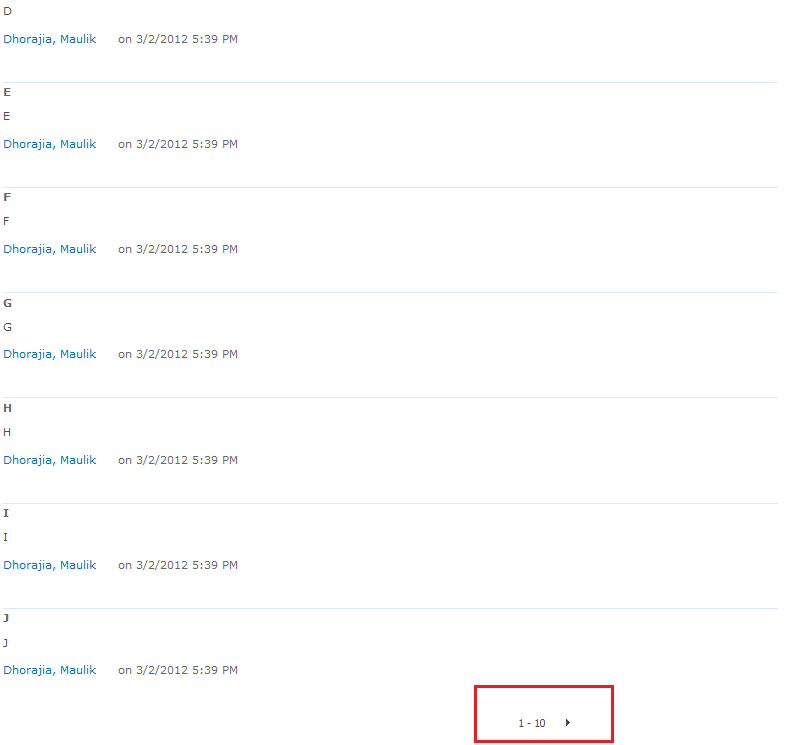
  3. Navigate to default blog created on site and add 11 comments. Right now the URL will be "http://pc92/TestBlog/Lists/Posts/Post.aspx?ID=1". This will enable the paging at the comments webpart.
  4. Now login with User2(Read, Limited Access User) and navigate to the URL "http://pc92/TestBlog/Lists/Posts/Post.aspx?ID=1". The page will show normal. The only difference here is you won't see the "Add Comment" box at the bottom of the screen.
  5. Click the next button. You will see the error.


Cause

The cause of the whole act is when you login as a User2(Read, Limited Access) the Comment Box(ListFormWebPart) is not available for this users. On page load everything is fine. But when you do a postback like paging event it bombs out. This might have got out of the site of MicroSoft Team.

Solution

I created 2 features, one is a site based feature(BlogFixSite) and another one web based feature(BlogFixWeb). On the BlogFixSite activation we check all the web which doesnot have BlogFixWeb activated and the template is a Blog template. So if the feature is activated I assume that the site is already having a fix. In the BlogFixWeb I go to the "Posts" folder and copy "Post.aspx" content and create "Post1.aspx". In the "Post1.aspx" i will remove the "ListFormWebPart" programatically. In "Post.aspx" at the bottom i will place a jquery which will check if the "Add Comment" box is missing than take the user to "Post1.aspx". Repeat the above given test cases and you should be all good.

BlogFixSite - C#

#region System
using System;
using System.Runtime.InteropServices;
using System.Security.Permissions;
using Microsoft.SharePoint;
using Microsoft.SharePoint.Security;
using Microsoft.SharePoint.Administration;
using System.Collections.Generic;
using System.Linq;
#endregion

namespace BlogFix.Features.BlogFixSite
{
    [Guid("63c859cc-77ff-436e-a79e-b4619a67c7c3")]
    public class BlogFixSiteEventReceiver : SPFeatureReceiver
    {
        #region Events

        /// <summary>
        /// Activating
        /// </summary>
        /// <param name="properties"></param>
        public override void FeatureActivated(SPFeatureReceiverProperties properties)
        {
            base.FeatureActivated(properties);

            try
            {
                //Site object
                SPSite _site = (SPSite)properties.Feature.Parent;

                if (_site != null)
                {
                    //Feature ID - BlogFixWeb
                    Guid _featureWeGuid = new Guid("c7178a85-ed45-4f27-bd4a-db2ec3eed95b");

                    //Web List
                    IList<SPWeb> _webList = (from _web in _site.AllWebs.Cast<SPWeb>()
                                             where string.Compare(_web.WebTemplate, "Blog", true) == 0
                                                 && _web.Features[_featureWeGuid] == null
                                             select _web).ToList();

                    //Change the post page
                    foreach (SPWeb _web in _webList)
                    {
                        //Enables the feature - BlogFixWeb
                        if (_web.Features[_featureWeGuid] == null)
                        {
                            _web.Features.Add(_featureWeGuid);
                        }
                    }
                }
            }
            catch (Exception Exc)
            {
                SPDiagnosticsService.Local.WriteTrace(0, new SPDiagnosticsCategory("BlogFixSiteEventReceiver - Activated", TraceSeverity.Unexpected, EventSeverity.Error), TraceSeverity.Unexpected, Exc.Message, Exc.StackTrace);
            }
        }

        #endregion
    }
}


BlogFixWeb - C#

#region System
using System;
using System.Runtime.InteropServices;
using System.Security.Permissions;
using Microsoft.SharePoint;
using Microsoft.SharePoint.Security;
using Microsoft.SharePoint.Administration;
using System.Collections.Generic;
using System.Linq;
#endregion

namespace BlogFix.Features.BlogFixWeb
{
    [Guid("564b0ad9-90a0-45fc-a672-901ec1fd111b")]
    public class BlogFixWebEventReceiver : SPFeatureReceiver
    {
        #region Events

        /// <summary>
        /// Activate the web based feautre
        /// </summary>
        /// <param name="properties"></param>
        public override void FeatureActivated(SPFeatureReceiverProperties properties)
        {
            base.FeatureActivated(properties);

            try
            {
                SPWeb _web = (SPWeb)properties.Feature.Parent;

                //All the subfolders
                SPFolderCollection _folderCollection = _web.Folders["Lists"].SubFolders;

                //Finds the folder containing Post.aspx
                IList<SPFolder> _folderPostList = (from _folderX in _folderCollection.Cast<SPFolder>()
                                                   let _fName = _folderX.Name
                                                   let _fCount = (from _fileX in _folderX.Files.Cast<SPFile>()
                                                                  where string.Compare(_fileX.Name, "post.aspx", true) == 0
                                                                  select _fileX).Count()
                                                   where _fCount > 0
                                                   select _folderX).ToList();


                //Loop it if there are more than one
                if (_folderPostList != null)
                {
                    foreach (SPFolder _folderPost in _folderPostList)
                    {
                        //Get the Post file
                        SPFile _filePost = (from _fileX in _folderPost.Files.Cast<SPFile>()
                                            where string.Compare(_fileX.Name, "post.aspx", true) == 0
                                            select _fileX).FirstOrDefault();

                        //The file post to be copied
                        if (_filePost != null)
                        {
                            //New Post1.aspx URL
                            string _newPostUrl = string.Format("{0}/{1}/{2}",
                                _web.Url,
                                _folderPost.Url,
                                "Post1.aspx");

                            //Copy the file
                            _filePost.CopyTo(_newPostUrl, true);
                            
                            //Update the folder
                            _folderPost.Update();

                            //Remove the control once the page is copied
                            Microsoft.SharePoint.WebPartPages.SPLimitedWebPartManager _webPartCollection = _web.GetLimitedWebPartManager(_newPostUrl, System.Web.UI.WebControls.WebParts.PersonalizationScope.Shared);

                            //Retrive the webpart and remove
                            Microsoft.SharePoint.WebPartPages.WebPart _listFormWebPart = (from _wp in _webPartCollection.WebParts.Cast<Microsoft.SharePoint.WebPartPages.WebPart>()
                                                                                          where _wp.GetType().UnderlyingSystemType.Name == "ListFormWebPart"
                                                                                          select _wp).FirstOrDefault();


                            //Microsoft.SharePoint.WebPartPages.ListFormWebPart _XlistFormWebPart = (Microsoft.SharePoint.WebPartPages.ListFormWebPart)_listFormWebPart;
                            //string _webPartTitle = _XlistFormWebPart.Title
                            //return;

                            if (_listFormWebPart != null)
                            {
                                //Remove the webpart
                                _webPartCollection.DeleteWebPart(_listFormWebPart);

                                //Update
                                _web.Update();
                            }

                            //Modify Post1.aspx and add the javascript tag
                            if (_filePost.RequiresCheckout)
                            {
                                _filePost.CheckOut();
                            }

                            //Edit the file
                            byte[] _htmlByte = _filePost.OpenBinary();
                            string _html = System.Text.Encoding.ASCII.GetString(_htmlByte);
                            string _topHtml = _html.Substring(0, _html.LastIndexOf("</asp:Content>"));
                            string _stript = "\n<script language=\"javascript\" type=\"text/javascript\">!window.jQuery && document.write('<script src=\"http://code.jquery.com/jquery-1.4.2.min.js\"><\\/script>');</script>\n<script language='javascript'>\n\r$(document).ready(function(){\n\r\rif($(\"h3[class='ms-CommentHeader']\").length == 1){\n\r\r\r\rwindow.location.href =     window.location.href.replace(\".aspx?\" , \"1.aspx?\");\n\r\r}\n\r});</script>";
                                

                            _html = string.Format("{0}{1}</asp:Content>", _topHtml, _stript);
                            _filePost.SaveBinary(System.Text.Encoding.ASCII.GetBytes(_html));

                            //Check In
                            if (_filePost.RequiresCheckout)
                            {
                                _filePost.CheckIn(string.Empty);
                            }
                        }
                    }
                }

            }
            catch (Exception Exc)
            {
                SPDiagnosticsService.Local.WriteTrace(0, new SPDiagnosticsCategory("BlogFixWebEventReceiver - Activated", TraceSeverity.Unexpected, EventSeverity.Error), TraceSeverity.Unexpected, Exc.Message, Exc.StackTrace);
            }
        }

        #endregion
    }
}


JavaScript added on Post.aspx

There are 2 "<h3></h3>" tags on the post.aspx page. (1) is "Comments" and (2) is "Add Comments". So if a user dont have access he/she wont see "Add Comment" box. If that box doesnot exists on the page I simply send the user to Post1.aspx.
<script>    !window.jQuery && document.write('<script src="http://code.jquery.com/jquery-1.4.2.min.js"><\/script>');</script>
<script language='javascript'>
    $(document).ready(function () {
        if ($("h3[class='ms-CommentHeader']").length == 1) {
            window.location.href = window.location.href.replace(".aspx?", "1.aspx?");
        }
    });</script>


Final Comments

To make this feature available for all the webs just create a feature stapler which activates the web based feature just like its done in "BlogFixSite".
I know many people wont agree with my solution but right now it is what it is. Happy Coding. Do let me know if this helped you.